

User Tools
Table of Contents
Troubleshooting - Incorrect owner assigned to tickets
Author: Michelle McCausland
Example Support Request
Example support ticket - CCSUPPORT-2029
User Tim Janis has 3 user IDs….2 that are incactive (tjanis and tjanis1) and 1 tht is active (tjanis2).

When tickets are moved to ASSIGNED – Field Tech Dispatched, they are being assigned to ‘tjanis’.

Even though the tjanis user account is inactive, since timothy.janis@crowncastle.com is the email assigned in the contact information, when the system uses that to select the user to assign it is selecting the first match….tjanis….it is not checking if that user is active or not before assigning.

Can you confirm this is what is happening?
Solution
I looked at the owner assignment process for an example ticket I was given - INC-1210749 which showed this behavior occurring.
My next step was to examine this workflow, in particular what occurs at the state - Assigned - Field Tech Dispatched in terms of owner assignments:
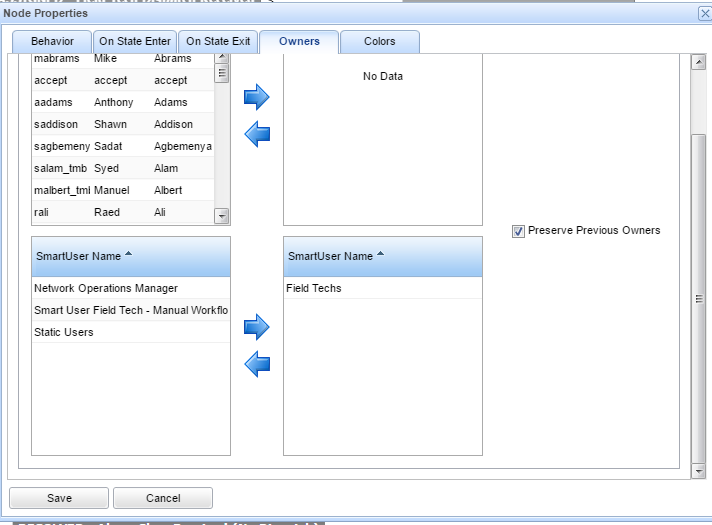
The key here is the Field Techs Smart Owner user group that is associated with the ownership assignment.
Next step was to go to the smart user admin section and click on the Field Tech group:
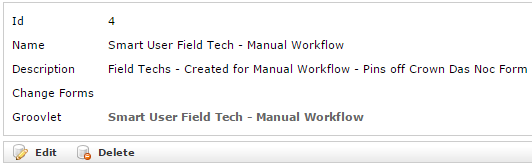
2 things to note here - the snmp trap form is mentioned here and the groovlet used is called - Smart User Field Techs
SELECT * from ticketer.groovlet where name LIKE “%Smart User Field Techs%”;
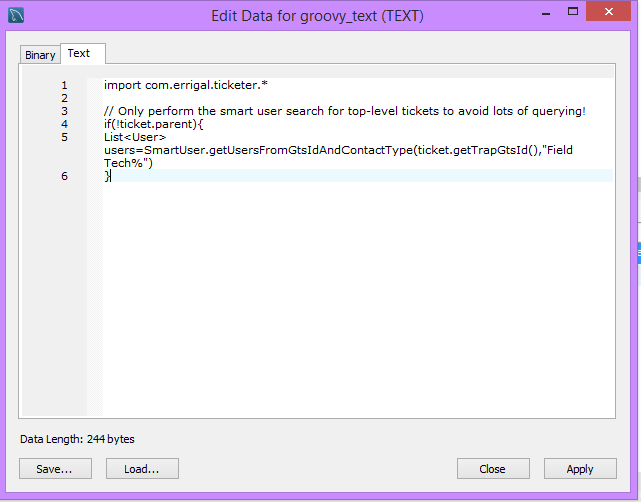
As you can see this looks as though it is referencing code in the ticketer code base - so that is where I went next.
I opened up the ticketer code base and searched for “getUsersFromGtsIdAndContactType” which brought me here:
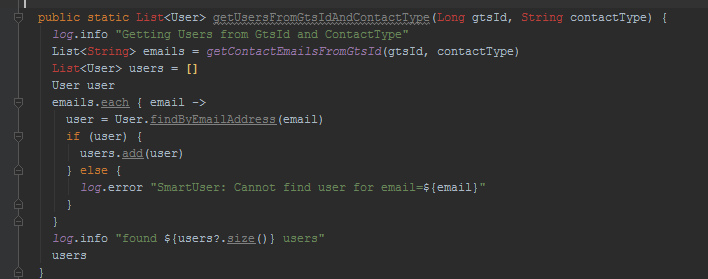
So as you can see what this boils down to is the following:
- The Field Tech smart user group looks for the network element info on the snmp trap form on the ticket
- From there it looks at the Field tech that is assigned to that network element and grabs the email address in order to determine the owner to assign to the ticket when this groovlet is actioned upon transition into the state - Assigned - Field Tech Dispatched
This is a long way around finding the root of the issue which was caused by the multiple accounts having the same email address!


