

User Tools
Table of Contents
Network Element topology overview and types
Author: David McGee
Prerequisite
Employees should watch the webex recording on Business operations of Errigal customers before proceeding with this article. This presentation was given by Padraig.
Overview

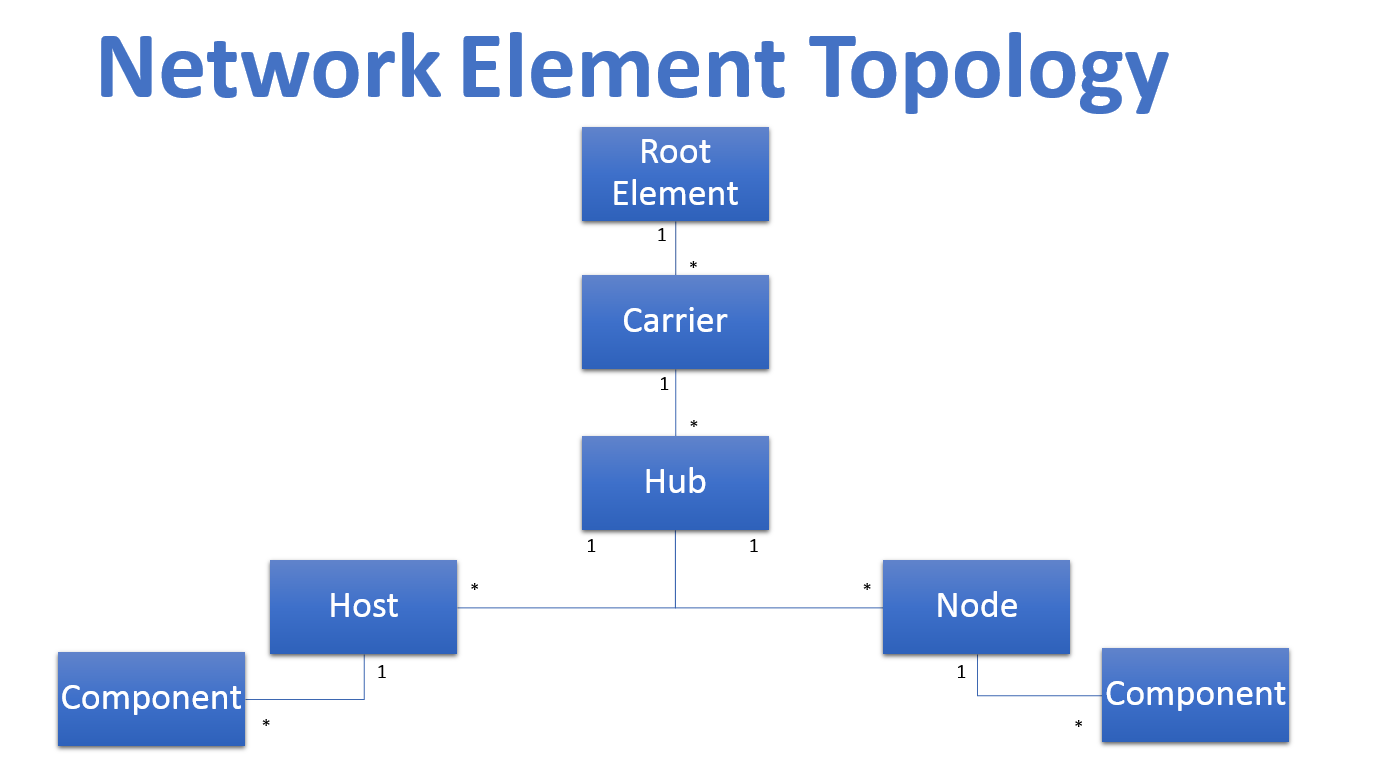
The diagram above outlines the most common and recommended topology for Errigal customers in a production environment.
This has evolved from a NextG Networks NOC monitoring era.
There has been many different flavours of this and some customers may use different terminology at times.
The SNMP Manager and it's database are flexible enough to cater for this, but it is good to study this diagram and get an idea of how things are setup.
Notes on above diagram:
- This relates to the relationships across the network_element table with parent_id, and ne_type fields (mostly!).
- One root element exists at the top of a NetworkElement hierarchy, named 'ROOT'.
- Generally, CARRIER level elements exist under this (e.g. ATT, VERIZON, SPRINT, CRICKET).
- CARRIER elements generally have many HUB level elements.
- HUB elements generally have many HOST and NODE level elements.
- HOST/NODE elements may have COMPONENTS. This is being seen further with the introduction of “Neutral-host” functionality in the IDMS.
Common Terms and alternatives
- Node / RU (Remote Unit) / Remote
- Host / OTRX Card
- Hub / Controller (Sometimes referred to as 'Host'!)
- Extension Unit (EU)
- Component
- Neutral Host / Open
Tips
- Check out the SNMP Manager Node Monitor view. This brings together the topology - drill down into carrier and hub elements.
- Take a look at the network_element table in the SNMP Manager database. It is one of the most important!
- The parent_id field in the network_element table assists us with creating meaningful topologies.
- You will hear different language being used from vendors to customers. Sometimes, it's important to clarify what someone means.
- Sometimes ExteNet Systems staff refers to 'Hubs' as 'Hosts'.
- Use of boolean flags assists with data management inside of the network_element table. on_air and show_in_monitor are used heavily.
Orphans
When a trap is received from an IP address that does not already exist in the knowledgebase an orphan element is created based on this information and placed in the orphan bucket.
An orphan can be identified in the node monitor under the Orphans section.
Clicking on the orphans bucket in the node monitor will bring up the list of orphans in the knowledge base.
Essentially, you should be able to judge based on the IP address of the orphan element if it does belong in the knowledgebase or if it can be deleted.
With the IP address you should be able to tell what system this element belongs to.
Self-assessment Questions
- What is a DAS Node/Remote?
- What is a DAS Host?
- How many DAS Nodes does Errigal have in it's QA databases?
- List the current carriers available on Errigal's QA database?
- Identify if there are any orphan elements in the Errigal QA Node monitor


