

User Tools
Writing /app/www/public/data/meta/onboarding/reportingmanager/troubleshooting_-_getting_a_fail500_error_when_running_a_report.meta failed
onboarding:reportingmanager:troubleshooting_-_getting_a_fail500_error_when_running_a_report
Table of Contents
Troubleshooting - Getting a Fail500 error when running a report
Author: Michelle McCausland
Example Customer Request
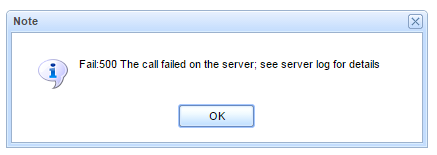
When trying to run this report, I get the following error:
Solution
More likely than not the issue is with the datasource being used by the report.
1. In the edit report window which displays the report code look for the datasource, something like :
def db=SqlConnectionManager.instance.retrieveSql("production")
- It is up to you to use your best judgement for the correct datasource - if you are using the ticketer database in your query then use the ticketer datasource or if you are using many datasources use the production datasource and reference all other databases using the databaseName.tableName convention e.g. ticketer.ticket
- Also, ensure if you are on QA to link to a qa datasource and similarly with production etc.
- Also, ensure the datasource is pointing to the correct customer site!
- If you are unsure of any of these just ask someone's opinion
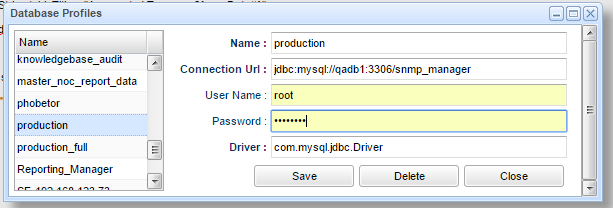
2. In the Admin Controls section at the top left of the reporting manager click - Manage Database Profiles. Scroll to the datasource (in this instance production) and ensure it is pointing to the correct datasource.
onboarding/reportingmanager/troubleshooting_-_getting_a_fail500_error_when_running_a_report.txt · Last modified: 2021/06/25 10:09 (external edit)


