

User Tools
Table of Contents
Dig Tickets Summary (Ticket List) Drilldown
Author: Eoin Joy
In the main interface of the Dig Portal, to the left of the screen is a list of currently pending Dig Tickets that require the attention of a Dig Portal User. This interface is how tickets are selected so that they can be zoomed to on the map.
The Ticket List
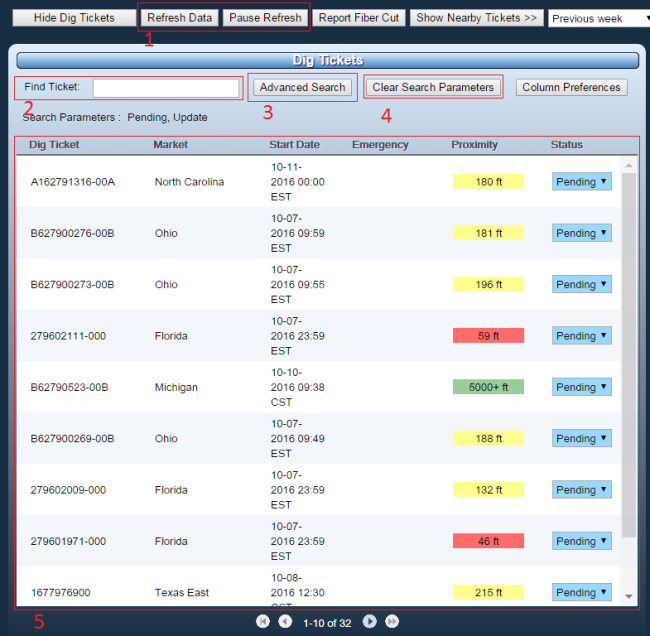
The Ticket List by default shows Tickets that have not been worked upon, but can be searched through specifically by Dig Ticket ID, or by using the Advanced Search option. The fastest way to work on Dig Tickets for the users is via the dropdown in the Status column.
Areas of the Ticket List Interface
- Refresh Data / Pause Refresh - By default, the list refreshes every 30 seconds. You can pause this behaviour with Pause Refresh if you feel you need to see one instance of the query for results for instance. You can force a refresh with Refresh Data.
- Find Ticket - You can use this text field to search all dig tickets by Dig Ticket ID, exact matches are not required
- Advanced Search - This allows searching by more fields and ranges. See below for more details.
- Clear Search Parameters - After a search by Dig Ticket ID or by Advanced Search, use this button to return to the default view of tickets
- List Of Tickets - The list of tickets currently as result of your search, default or otherwise
Advanced Search
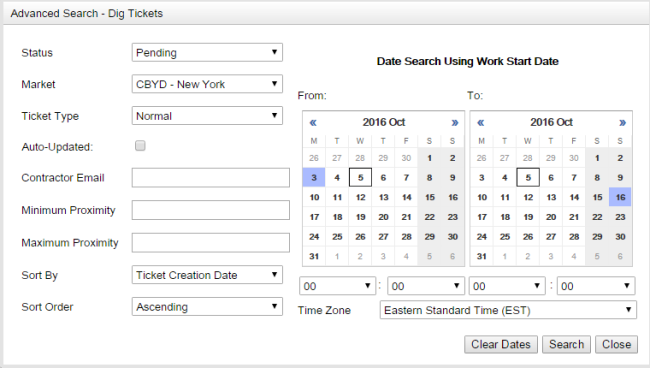 The Advanced Search allows you to search all Dig Tickets by several criteria. These criteria include the status, market, proximity and start date and time of the tickets.
Ticket Pagination
Tickets in the default query are sorted in a newest-first fashion. Ten Tickets will display on a single page of the list. At most 10 pages will be returned by the default query. This means that in the default view at most the 100 newest Dig Tickets will be displayed.
Assessment
- How would you find Dig Ticket A623103245-00A?
- Search for all Dig Tickets with a Work Date in the previous week for the Southern California market


