

User Tools
Table of Contents
Dig Ticket Selection
Author: Eoin Joy
There are several ways to select a dig ticket to see more details on it in the case that it is not immediately obvious what status it should be put into.
Select From Ticket List
The most common way to select a ticket to appear in the map interface is by selecting it from the Ticket List, either from the default query, or from some search you have performed. It is as simple as clicking on the entry in the list and the Pin will appear on the map, the map will zoom to the pin, and the Fiber overlays for that market will be loaded and displayed.
Select From Nearby Tickets
When the viewport is sufficiently zoomed in, you can select the Show Nearby Tickets » button with a time range of 1 week, 2 weeks, 1 month, 3 months, 6 months, or 1 year. This will show pins on the map for any Dig Tickets in that area during the defined timeframe.
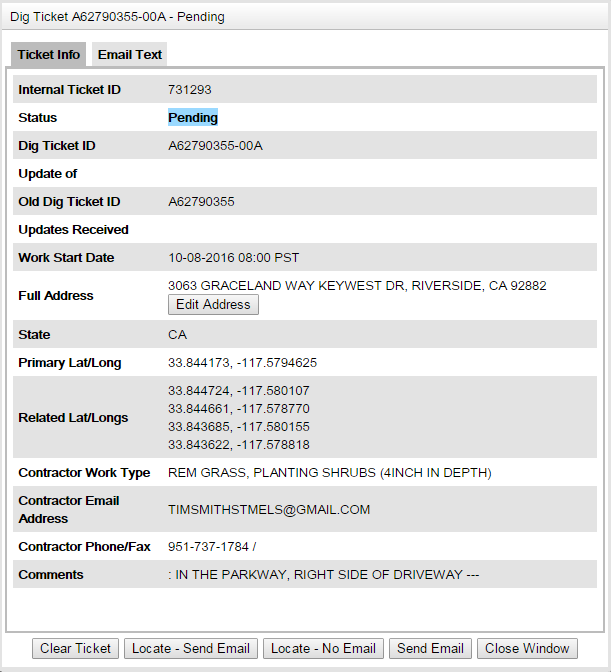
The Ticket Info View
When you click on a pin in the map view, the Ticket Info view is opened for that Dig Ticket. This view has two tabs: Ticket Info and Email Text.
Ticket Info
This tab contains the info stored in the system about the Dig Ticket you have selected. This information includes its status, internal ticket id, when the work is scheduled to start, the address given of the work, any lat long information, and the contractor details.
Email Text
This tab contains the full email text of the email that was parsed to create this Dig Ticket.
Available buttons
The available actions on the Ticket Info view include actions that are implicitly performed by using the dropdown on the Ticket List
Clear Ticket
Moves the Ticket into a Clear status
Locate - Send Email / Locate - No Email
Moves the ticket into a locate status, with the option whether or not to send the email to the locate company for that region.
Send Email
Send an email related to this ticket, such as a locate, without the need to change its status.
Assessment
- What are the Lat/Longs associated with Dig Ticket A62790434-00A?
- Find an area with more than one Dig Ticket pin visible.


