

User Tools
databaseandnetworkmanagement:accessing_visual_vm
Table of Contents
Accessing Visual VM
Author: Cathal O'Keeffe & Michelle McCausland
Introduction
Visual VM is a tool used to monitor server activities such as Process Performance And Memory.
The tool also allows you to take and display thread dumps.
It can be downloaded from the following link: Download Visual VM
Connecting to Servers
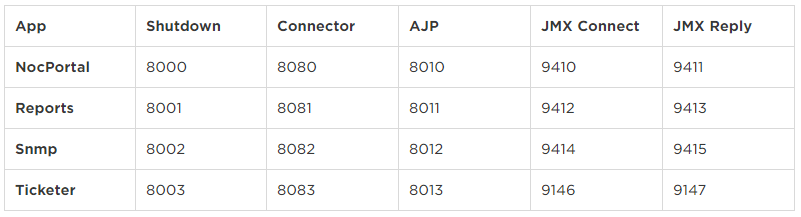 (CAS Port: 9418)
(AlarmCache Port: 9428)
(CAS Port: 9418)
(AlarmCache Port: 9428)
observer
#jmx321!#
When setting up a JMX connection, the host name must duplicate the one specified in the -Djava.rmi.server.hostname paremeter of the application startup.sh script
(i.e. one cannot use the server IP - the hostname has got to be precisely the same).
Note: Ensure you have the names in your hosts file for the connection to be successful (won't work otherwise).
Working with Visual VM
Local Settings
Append the following settings to the Run Grails configuration in your IDE:
-Dcom.sun.management.jmxremote.port=9414 -Dcom.sun.management.jmxremote.ssl=false -Dcom.sun.management.jmxremote.authenticate=false -Djava.rmi.server.hostname=localhost
databaseandnetworkmanagement/accessing_visual_vm.txt · Last modified: 2021/06/25 10:09 by 127.0.0.1


