Table of Contents
Useful Excel Formulas
Author: Michelle McCausland
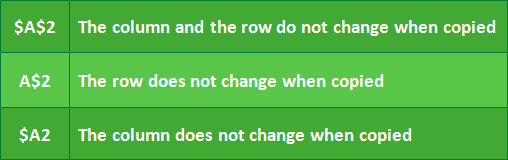
Cell Referencing
=RIGHT() =LEFT()
=RIGHT(A1,9) &", "
Using the contents of cell A1, this formula removes 9 characters from the right and prints with , at end (same for =LEFT())
=RIGHT(A1, LEN(A1)-1)
Try this out on a cell of text to see the effect.
=CONCATENATE()
=CONCATENATE(A1,", ",B1)
This formula concatenates / appends the contents of multiple cells into 1 cell.
=VLOOKUP()
The VLOOKUP function lets you search for specific information in your spreadsheet. For example, if you have a list of network elements with ids, you could search for the id of a specific network element.
This formula can prove very useful when comparing 2 sheets of data to see what is missing.