Table of Contents
ScottyPro Support Forms and Important Fields
Updated: Loughlin Moore
Introduction
This page contains details about the forms used on support tickets in ScottyPro.
Important Fields
- Summary
- Latest Update
- Estimate
Support Request Details Form
This form is added to all support tickets upon ticket creation.
The form is used to contain information relating to the support request.

Support Request Page
When a ticket is created by the Support Request Page the Triage section of the Support Request Details form is already populated. The Technical Details section is for Operations to complete, it is important that you check the Context field had the relevant options selected.
Form Fields
- Requester Email - Email the person who requested the ticket.
- Point of contact - Relevant contact to speak to in relation to the ticket.
- Email CC List: For tickets managed by the support page this is where the list of who is copied on and the notification emails (such as the initial and update notification emails.) are managed.
- Issue Tile: This is a read-only field and contains the initial summary customer submits when the ticket is created via the Support Page.
- Description - Details describing the issue. Tickets created by the Support Request Page will customers description here.
- Context - Select if issue or request affects an Application, Network,Hardware, Operation System or relates to an installation.
- Label - If there is a label suitable to the ticket e.g. Escalated Priority, then this is selected here.
- Area - Dropdown to pick what area of the platform the issue relates to,
- Action - What action will be taken on this ticket.
- Short Details - Further details of what the issue or request is.
- Billable Status- Confirm if the ticket is non-billable or billable, “Not Set” if it's not known at the time ticket is created.
- Auto Subject - When this is checked a Groovlet will combine the Context, Area, Action and Issue or request fields to form the ticket summary.
- Notes - When the Support Page is deployed to all customers the description field will be set to read-only. When a ticket is triaged this field is where Operation can add relevant notes related to the initial findings.
- Log Required? If a log is required to investigate the ticket then a link to their location should be provided. The dropdown has three options:
- Not Available
- Not Required
- Not Yet Provided
- Provided
- Related development tickets - If there are related development tickets, they are included here.
- Related support tickets - If there are related support tickets, they are included here
- Latest Update - This field is used to contain the latest update on the ticket for ease of access. e.g. “Ticket is awaiting X from the customer to continue.”
- Next Update Due - Used when you want to communicate when the next update will be provided on the ticket. Mainly used when a ticket is in the State of “Customer Response Provided.”
Note: When you are filling out the Support Request Details form for tickets created by the support page The fields in The Triage section are prepopulated. You can use the contents of the “Issue Tile” as a guide to what the “Issue or Request” should be.
Important
If you need to make a change to the Action section you will need to change the Area selection first, even if you don't want to change its selection you need to select something else and then select the one you want again so that the groovlet populate the Action field, otherwise, it will show blank.
DB tables
Area
ticketer.form_component_category
Action
ticketer.form_component_option
Internal Update
This form is restricted to admin and support users.

Used for ticket updates for internal contacts only.
On Hold Form

This form is added to the ticket when the ticket is placed into on hold.
Form Fields
- On hold requested by - The name of the person that requested the ticket be placed into on hold is included here.
- Date to revisit - The date when the ticket should be revisited is included here.
- On hold description - The details of why this ticket is on hold are included here.
Related E-mail Form

Customer Communication Call Form
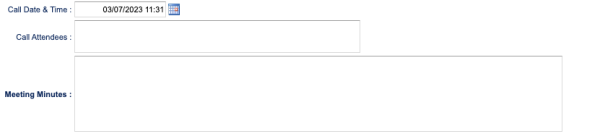
Approval Form
Used only as part of billing review.

Resolution Form
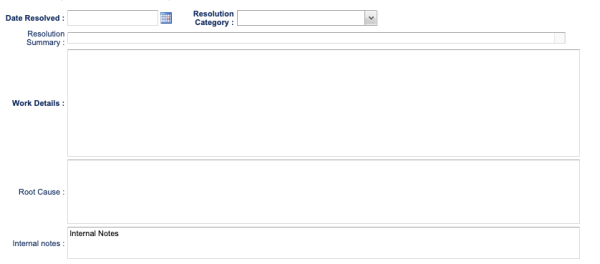
Resolution Category
- Change Request - Customer has requested a change is a feature
- New User/Update User - New users or change to user permissions
- Customer Education - Ticket resulted in showing customer how the platform is designed to work
- Defect - System is not working as designed due to a bug or some other problem.
- Duplicate Ticket - A Ticket already exists
- Engineering Required - Development team will need to investigate or required a IDMS release to resolve.
- Maintenance - Server, Database or Network Maintenance
- New Feature OS / HW / NW Related - See RCA - OS / HW / NW Issue is detailed in RCA
- Request Cancelled - Customer no longer requires ticket.
- Unquantified Before Reboot - Reboot of system resolved issue but not clear what caused problem
- Working as Designed
- Monthly Ticket - Admin - Used for Monthly/Quarterly Tickets