Troubleshooting - Determining which trap rule to update
example from CCSUPPORT-1912
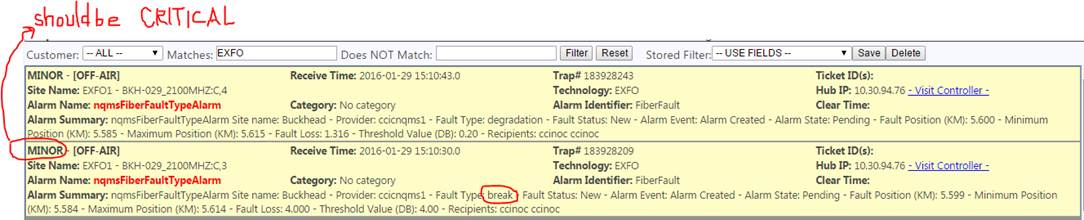
The trap rule needs to be changed to fix the problem we have here where an alarm should be critical but is minor.
You may need some information to determine which rule is being used and what needs to be edited for a fix. Which trap rule is it? Which MIB contains the specification of this alarm?
Get the ID of the trap from the given GTSID (shown as Trap#)
select trap_id from general_trap_summary where id=183928209;
| trap_id |
| ——— |
| 208454825 |
————-
Get the OID of the trap from the trap table
select name_oid from trap where id=208454825;
| name_oid |
| ————————— |
| .1.3.6.1.4.1.6718.3.2.2.3.0 |
——————————-
Get the trap rule id, the mib id, and the trap name from the trap_rule table
select id, mib_id, trap_name from trap_rule where trap_oid = '.1.3.6.1.4.1.6718.3.2.2.3.0';
| id | mib_id | trap_name |
——————————————-
| 2014 | 402 | nqmsFiberFaultTypeAlarm |
——————————————-
Get the name of the MIB you need using the mib_id
select file_name from mib where id=402;
| file_name |
| ——————— |
| NqmsFiberEventMib.mib |
————————-
Using the information we have gathered, you can directly get to the trap rule edit page by going to %SERVER%:8082/SnmpManager/trapRule/edit/2014
And if you need to apply the update through the UI you can select Create/Edit Rules and select the MIB file NqmsFiberEventMib.mib and the name of the trap rule nqmsFiberFaultTypeAlarm