Table of Contents
Tooltips Guidelines
The following post is summarized from the article Tooltip Guidelines from the Nielsen Norman Group website.
What is a tooltip?
Definition: A tooltip is a brief, informative message that appears when a user interacts with an element in a graphical user interface (GUI). Tooltips are usually initiated in one of two ways: through a mouse-hover gesture or through a keyboard-hover gesture.
Tooltip-Usage Guidelines
The following screenshot just about sums it up:
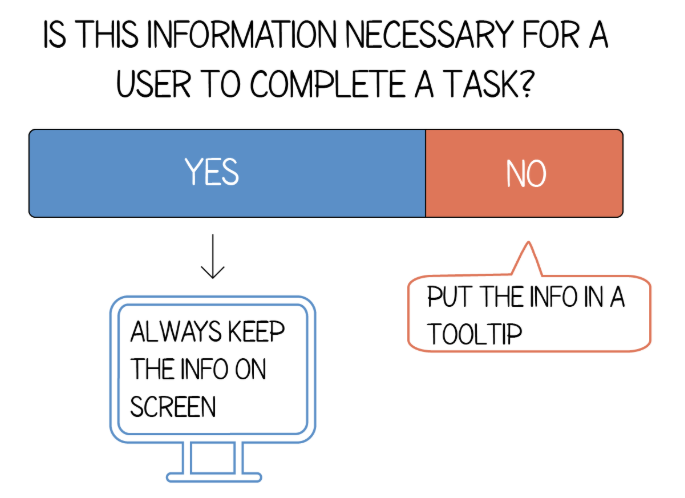
1. Don’t use tooltips for information that is vital to task completion.
Users shouldn’t need to find a tooltip in order to complete their task.
2. Provide brief and helpful content inside the tooltip.
Tooltips with obvious or redundant text are not beneficial to users.
If you can’t think of particularly helpful content, don’t offer a tooltip.
3. Support both mouse and keyboard hover.
Tooltips that appear only on mouse hover are inaccessible for users that rely on keyboards to navigate.
Be inclusive in your design and ensure that your tooltips are accessible via keyboards.
4. Use tooltip arrows when multiple elements are nearby.
Arrows are beneficial to clearly identify to which element the tooltip is associated.
When there are several nearby elements, these arrows help avoid confusion.
5. Use tooltips consistently throughout your site.
Tooltips are hard to discover because they often lack visual cues.
It’s important to be consistent and provide tooltips for all the elements in your design rather than just for some.
6. Provide tooltips for unlabeled icons.
Most icons have some level of ambiguity, which is why we recommend text labels for all icons.
7. Position tooltips so they don’t block related content.
When tooltips block the content they’re related to, they cause users to repeat steps (i.e. move their mouse to close the tooltip, read the information or field again, hover to reveal tooltip).
Test your tooltip positioning to ensure that the content does not block other information pertinent to the user’s goal.
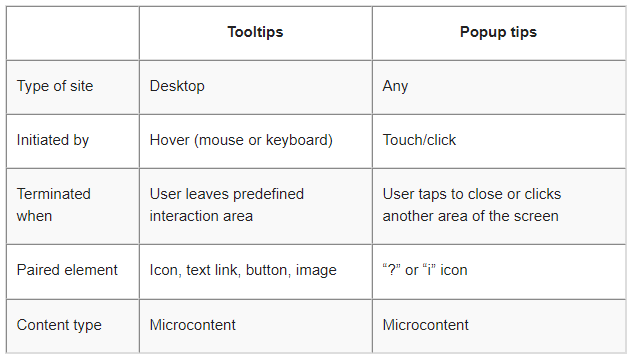
Tooltip-VS Pop-up Tips