Table of Contents
UI Patterns - Notifications
Author: Michelle
What Are Notifications?
- Notifications must assist (not impede) people to perform tasks.
- Addressing notification design early in the product design process will produce better results.
- All copy on notifications must be clear, concise, and useful
- Notifications work with the Visibility of System Status Usability Heuristic - without them, it's like driving a car without a dashboard.
Establishing A Notification Framework
- Think in terms of signal strength - which notifications need more or less attention?
- For example, interactions that may potentially be destructive need “louder” notifications, and non-destructive interactions need “quieter” ones.
- Good idea to give users the flexibility to turn off all or some notifications.
Notification Classification
- Initially classified via levels of severity: High, Medium, Low
- Then by notification type: alerts, warnings, confirmations, errors, success messages, status indicators
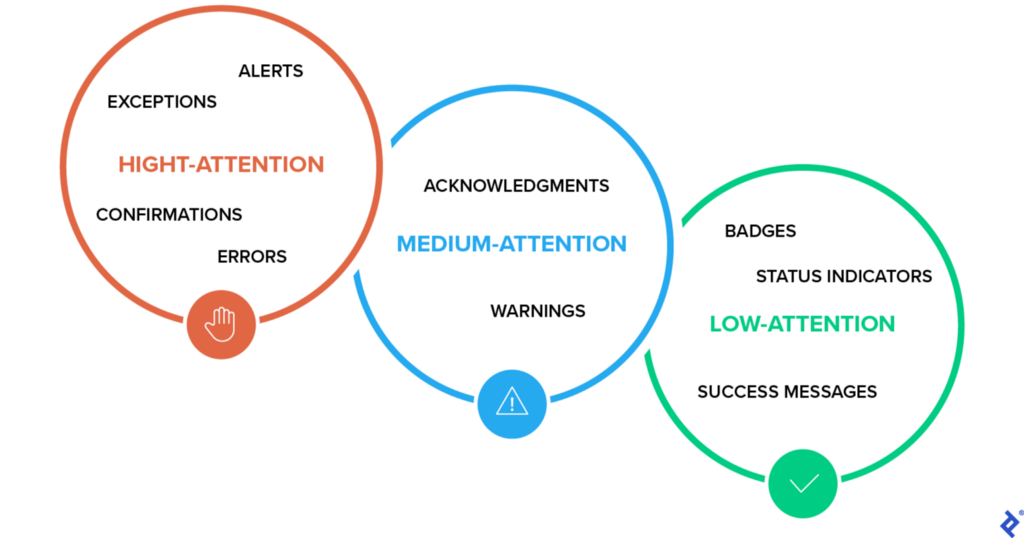
- High Attention
- Alerts (immediate attention required)
- Errors (immediate action required)
- Exceptions (system anomalies, something didn’t work)
- Confirmations (potentially destructive actions that need user confirmation to proceed)
- Medium Attention
- Warnings (no immediate action required)
- Acknowledgments (feedback on user actions)
- Success messages
- Low Attention
- Informational messages (aka passive notifications, something is ready to view)
- Badges (typically on icons, signifying something new since last interaction)
- Status indicators (system feedback)
Designing Notification UX
- make a list of all use cases where notifications may be helpful
- categorize the notifications based on attention level and type
- Some questions to ask:
- What would trigger the notification?
- What type of feedback is being communicated?
- Where would the notification appear and how?
- Which notification would require an immediate interaction?
- Is the notification persistent or non-persistent?
- Color coding & icons needs to be determined - needs to render correctly on all backgrounds.
- Consider placement
- to avoid obscuring the interface, notifications should appear at the top or bottom, or near the corners of the UI
- if the design is responsive, designers need to test the appearance of notifications with various viewports
- Further questions to ask when it comes to defining the behavior of notifications:
- If an alert or warning is meant to be persistent, how do designers ensure that people still have access to them after they navigate away from the initial screen?
- Would an alert icon with a badge need to be incorporated where an archive of notifications could be seen?
- If a notification is non-persistent, how long before it disappears, and should there be an option to dismiss it before it fades out?
Notification Best Practices
- When creating a style guide for the notification system, specify the maximum character lengths for the notification in all languages in which it will be released.
- Err on the side of showing fewer notifications, whether they’re alerts or warnings, or other high- to middle-attention status updates. Instead, put them in a list people can access when they want to see them (signified by an icon badge in the UI).
- Consider a system with an option to mark notifications “do not show again.”
- Non-persistent acknowledgments such as “snack bars” should disappear from the screen after a minimum of four seconds and a maximum of eight seconds, with an option to dismiss it sooner and “undo” where appropriate.
- Ensure proper contrast on notifications for readability and between the background on which the notifications appear. Be aware that with fluid, responsive designs, the background may shift under the notification.
Best Practices for Error Messages
- Error messages should be simple and direct, preferably actionable, written in a language that is easy to read and quick to comprehend.
- Avoid obscure codes and abbreviations
- Avoid blaming people or telling them they did something wrong
- Avoid indicating an error just by turning the field red. It doesn’t make it accessible to people with disabilities. It’s always best to include other visual cues that the colorblind can see.
- Error messages should not disappear until people have fixed the problem.