Table of Contents
Log Rotation - Setting up log rotation on a server
Author: Michelle McCausland
Introduction
Log rotation is setup as a bash script that manages the log files on the server to ensure older logs are deleted and that logs are zipped up to save space.
The log rotation script, is found in ~/script/log_rotation.sh on a server that has this configured already.
Log rotation script
The log rotation script is a bash script that performs a set of commands on a given interval through the crontab.
In the case of this example the log rotation script will remove any logs older than 28 days. It will also zip up the logs to allow for more storage of logs:
log_rotation.sh
#!/bin/bash

/usr/bin/find /home/scotty/logs/grails/ -type f -mtime +28 -exec rm {} \;

/usr/bin/find /home/scotty/logs/grails/ -type f -mtime +1 -exec gzip *.log.20* {} \;
- Line 1: required command which denotes this is a bash script
- Line 2: this looks in the logs folder and will remove any files older than 28 days
- Line 3: this looks in the logs folder and will zip up all files matching the convention “.log.20”.
Important to note the following “-mtime +1”. It is essential that this is included when zipping up the logs so the current day's logs to not get zipped up too. This will cause a watchdog!
Set Up Log Rotation
- Step 1: Create log_rotation.sh on the ~/script directory
- Step 2: Ensure the file permissions are correct. Type ls -lh to review permissions and ensure they match the log_rotation.sh permissions below:
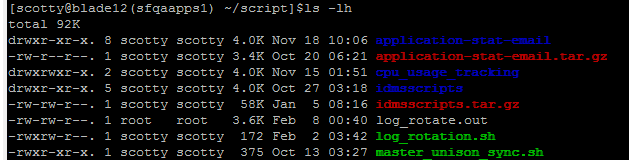
chmod 774 log_rotation.sh
To learn more about linux file permissions I recommend reading the following: http://linuxcommand.org/lc3_lts0090.php
- Step 3: Now you have the log rotation file setup, it is time to modify the cron to run this bash script on a given interval.
Type sudo crontab -e to display the crontab:

The line we are concerned with for log_rotation is:
#Log Rotation Job - Setup 31st Jan 2017 - SUPPORT-330

40 0 * * * /home/scotty/script/log_rotation.sh > /home/scotty/script/log_rotate.out 2>&1
This should be included in the crontab to ensure the log_rotation.sh script is executed.
To learn more about how the crontab works I would recommend reading the following: http://www.thegeekstuff.com/2009/06/15-practical-crontab-examples/
- Step 4: You should now have successfully set up log rotation! To ensure this has worked correctly it is important to check the logs directory after the log_rotation.sh script has run at least once.